Social Lifestyle
- 2.5
- Rating
- 10.00K
- Installs
- Free
- Price

 Analysis by App-foxy
Meeting people through a social app can sound easy until you open one and wonder what to do first. Social Lifestyle, developed by Swing, LLC, is aimed at people looking for lifestyle friends rather than a general feed full of unrelated updates. I approached it with that narrower purpose in mind: not as a replacement for every social network, but as a place to look for people who may already understand the kind of social connection you want.
The app is free to install, carries a Mature 17+ rating, and is available for devices running Android 6.0 or later. Its current version is 9.1.03. The basic entry cost is therefore low, although the in-app purchase range can reach from $24.99 to $199.99 for an item, so I would not explore paid options until I understood what the free experience offered me.
What to expect before you begin
The most important expectation to set is that this is a focused social discovery tool, not a conventional messaging app where your existing contacts are automatically the center of attention. The useful question is not simply, “Who is online?” It is, “Which people here are looking for the same kind of lifestyle friendship I am?” That difference affects how you should present yourself and how patiently you should browse.
You May Also Like

 AccuWeather: Weather Radar
AccuWeather Review: A Quick, Clear Forecast for Everyday Decisions
For everyday plans, the best forecast is the one you can understand quickly. AccuWeather makes rain timing, radar, and local conditions easy to act on, with a few trade-offs.

 Hill Climb Racing
Why Hill Climb Racing Still Turns Crashes Into One More Run
A tiny car, a bumpy hill and one more upgrade: Hill Climb Racing keeps resurfacing because its simple chaos makes every near-miss feel personal.

 AliExpress - Shopping App
AliExpress Makes Global Shopping Feel Personal, but Shoppers Bear the Risk
AliExpress turns a global marketplace into a pocket-sized discovery engine. Its reach is useful, its shopping loop compelling, and its trade-offs easy to miss.

 Lords Mobile: Kingdom Wars
Lords Mobile Is a Kingdom-Building Routine, Not a Quick Match
A case-by-case verdict on the building, battles, device demands, and social commitments that make Lords Mobile rewarding for some players and exhausting for others.

 PDF Scanner app - TapScanner
TapScanner Makes Paperwork Easier to Capture, Check, and Share
TapScanner makes scanning with a phone feel less like a rescue operation and more like a dependable step in getting work done. Its capture tools are useful, though not flawless.

 Block Blast!
 Shows How Much a Puzzle Game Can Leave Out
A quiet grid game shows why puzzle players increasingly value instant clarity, repeatable skill and low-pressure play—and where the genre still needs to catch up.
More From Our News Desk
View All News


The app belongs to the social category and has passed the ten-thousand-install mark. Its average rating is 2.5 from 61 ratings, with 40 written reviews, which tells me to approach it with realistic expectations rather than assuming a polished, universally loved experience. Those figures do not make the app unusable, but they do suggest that your success may depend heavily on your location, the activity of nearby members, and how carefully you use the available discovery tools.
I would also keep the Mature 17+ label in mind before creating an account. That rating is a practical signal about the audience and the kinds of conversations or profiles you may encounter. It is especially relevant if you are considering the app for someone younger, or if you want a strictly general-purpose friendship platform with a more neutral atmosphere.
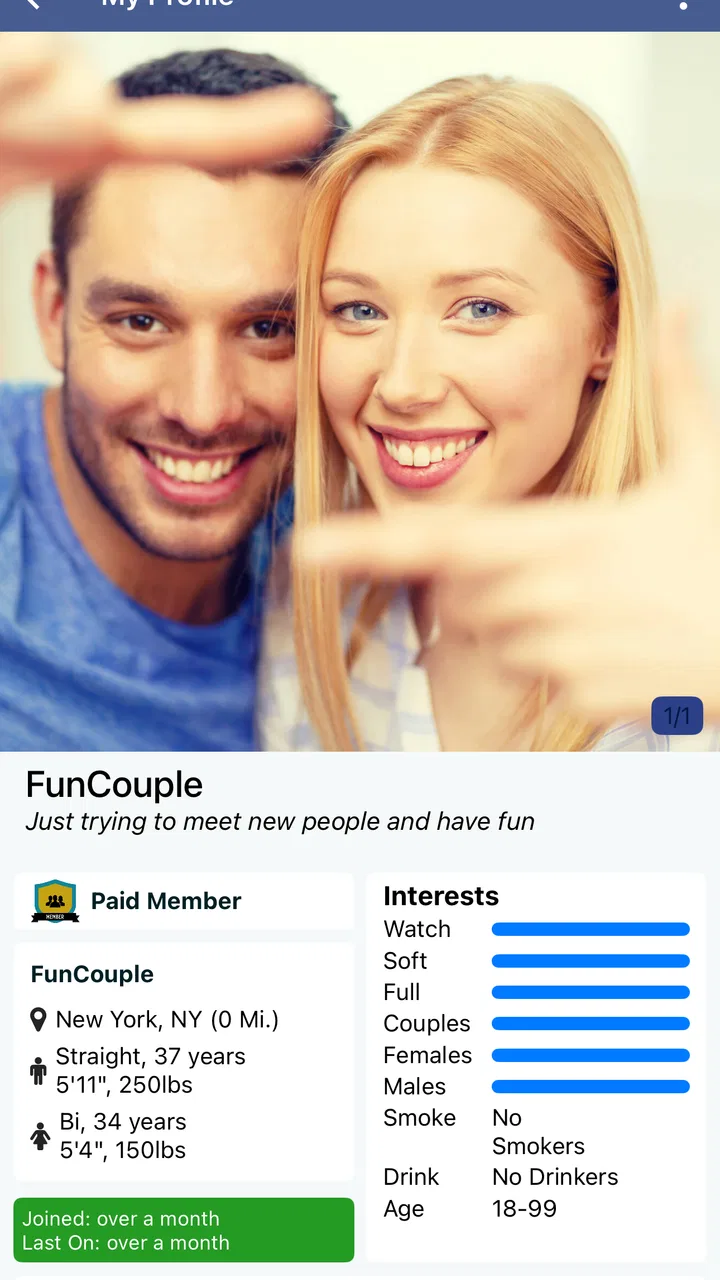
For a first-time user, the best mindset is to treat your profile as a filter, not a performance. A vague introduction may attract attention, but it will not necessarily attract the right people. A short, clear description of the kind of lifestyle friendship you want gives others a reason to start a useful conversation and gives you an easier way to decide whether a response is relevant.
Choosing the right reason to join
Before setup, decide what “lifestyle friends” means for you. You might want people for relaxed conversation, local social plans, shared interests, or a more specific kind of connection. You do not need to reveal private information to explain your goal. Even a simple statement about the activities you enjoy and the type of interaction you prefer can make your profile easier to understand.
This is one of the first places where Social Lifestyle differs from a broad network such as Facebook or Instagram. Those services are built around people you already know, public posting, and ongoing feeds. Here, your profile has to do more of the introductory work because the purpose is finding compatible new connections. Compared with a dating-first app, the emphasis is also different: you should describe the social experience you want instead of writing as if every interaction is a romantic audition.
Setting up an account without overthinking it
Once installed, I would take a measured approach to the initial setup. Read each screen instead of tapping through automatically, particularly when the app presents choices related to your profile or discovery experience. The goal is to create enough context for other people to understand you while avoiding details that would make you uncomfortable if seen by a stranger.
A useful profile has three layers. First, say what sort of person you are in ordinary language. Second, explain what you hope to find through the app. Third, give a low-pressure opening for conversation, such as a topic or activity you genuinely enjoy. This structure is more effective than a list of labels because it gives another user something specific to respond to.
I would avoid copying a polished introduction from somewhere else. Social discovery works better when the wording sounds like a real person. If you are looking for occasional conversation, say so. If you want to meet people for activities, make that clear. If you are still exploring the community, you can say that too. Honest uncertainty is more useful than promising a type of availability you cannot maintain.
Profile photos deserve the same care. Choose an image that represents you clearly and comfortably, but do not include visible addresses, work badges, school details, or other information that makes your routine easy to identify. A recognizable photo can help people trust that the account is genuine, yet oversharing creates a privacy trade-off that no social app can remove for you.
How to make the first screen useful
When you reach the discovery area, resist the temptation to contact everyone who looks vaguely interesting. A smaller set of thoughtful interactions is easier to manage and more likely to lead somewhere meaningful. Look for a profile detail that gives you a natural starting point, then refer to that detail rather than sending a message that could have been directed to anyone.
There is also a practical reason to move slowly: new users often mistake activity for compatibility. A busy-looking profile or a fast response does not automatically mean the person wants the same kind of friendship that you do. Compare their stated interests with your own expectations, and notice whether their messages respect the boundaries you described.
If the app offers optional paid choices during setup or discovery, I would postpone them. The free price makes it sensible to learn the basic flow first: how profiles are presented, how conversations begin, and whether the community feels active for you. Spending before answering those questions can turn uncertainty into an expensive experiment, especially because individual purchases may cost as much as $199.99.
Turning browsing into the first meaningful success
For me, a successful first action would not be collecting a large number of connections. It would be finding one profile that appears genuinely compatible, sending a respectful message, and learning whether the conversation feels easy. That is a much better early test of the app than counting views, matches, or replies.
Try a message with three parts: mention something specific from the other person’s profile, connect it to your own interest, and ask one simple question. For example, if someone describes enjoying a certain kind of social activity, you might explain that you have been looking for people who enjoy the same atmosphere and ask what they like most about it. This feels personal without becoming intrusive.
Do not make the first message too intense. A lifestyle friendship usually develops through small signs of reliability: a response that answers your question, a conversation that does not immediately become demanding, and an ability to respect a slower pace. If someone pushes for private details, money, or an immediate offline meeting, that is a reason to pause rather than a sign that you have found a stronger connection.
A realistic everyday scenario would be a person who has moved to a new area and wants social contacts outside work. Instead of posting publicly to a large mixed audience, they can use the app to look for people whose profiles indicate a similar interest in lifestyle-based friendship. After finding a promising profile, they can begin with conversation, compare expectations, and only later decide whether an in-person activity feels appropriate.
That workflow is more deliberate than scrolling through a general social feed, but it is also more purposeful. The trade-off is that you may see fewer immediately familiar interactions. The benefit is that a good conversation has a clearer reason for existing from the beginning.
When a conversation deserves a second step
After a few exchanges, ask yourself whether the interaction is balanced. Are both people asking questions? Can you disagree or clarify something without the tone becoming hostile? Does the person remember what you said, or do they repeatedly steer the conversation toward their own demands? These small observations are more valuable than a profile’s first impression.
If the conversation feels promising, suggest a modest next step rather than making a dramatic commitment. Continuing to chat at a comfortable pace can be enough. If you eventually plan to meet, choose a public setting, tell someone you trust, arrange your own transportation, and keep the first meeting easy to leave. The Mature 17+ audience and lifestyle focus make personal judgment particularly important.
For younger users, this is not an app I would recommend casually. The age rating should be treated as a genuine boundary, not a suggestion to ignore. Adults should also remember that an age label does not verify the identity or intentions of every person they encounter. The app can help people discover one another, but it cannot replace basic caution.
Common points of confusion during use
One likely confusion is assuming that every profile represents the same kind of relationship. The phrase “lifestyle friends” can mean different things to different people. Some users may want casual conversation, some may be seeking activity partners, and others may have a more specific social expectation. If a profile is unclear, ask a polite question before investing much time.
Another mistake is treating the platform like a standard social network. A general network rewards frequent posting and passive browsing, while this app is more useful when you actively refine what you are looking for and communicate clearly. If you only scroll without updating your profile or starting relevant conversations, the experience may feel empty even when suitable people are present.
Paid features can create a separate source of uncertainty. Because the app is free but includes purchases from $24.99 to $199.99 per item, check what an upgrade actually changes before confirming it. Do not assume that paying will guarantee a reply, improve compatibility, or solve a lack of activity in your area. Money may increase access to a tool, but it cannot create mutual interest.
The rating of 2.5 is another detail worth interpreting carefully. It is a warning to test the app personally rather than a complete verdict. Some complaints may reflect individual expectations, device experiences, or differences in local communities, while some may point to genuine friction. I would give the app enough time to understand its basic flow, but I would not force myself to continue if the interface, community, or conversations consistently feel uncomfortable.
Privacy is also easy to misunderstand. A social profile is not the same thing as a private diary. Avoid publishing your exact home location, daily schedule, financial information, or documents. Keep early conversations inside the app until trust has been earned, and use the available safety controls if an interaction becomes aggressive, manipulative, or unwanted.
Who will benefit and who should skip it
Social Lifestyle is most suitable for adults who are intentionally looking beyond their existing circle and are willing to explain what kind of social connection they want. It may work well for someone entering a new community, exploring a particular lifestyle interest, or preferring focused discovery over a huge general-purpose feed.
I would skip it if you want a private messenger for people you already know, a professional networking tool, or a dating service with clearly defined romantic matching. I would also look elsewhere if you dislike initiating conversations or expect a large, consistently active local community immediately. The app’s purpose requires participation from both sides, and no profile design can overcome a thin pool of suitable people in a particular area.
Compared with broad social networks, the advantage is focus. Compared with dating apps, the advantage is that friendship and lifestyle compatibility can be the starting point rather than an afterthought. The disadvantage is that the narrower purpose may make the community feel less predictable: two users can both be interested in “lifestyle friends” while imagining very different boundaries and outcomes.
Making the next step worthwhile
After your first conversation, improve your approach based on what you learned. If people misunderstand your intentions, rewrite the opening lines of your profile. If you receive attention but not useful conversations, make your interests more concrete. If you find good discussions but struggle to continue them, ask fewer broad questions and share a little more about your own experience.
A simple weekly routine can help without turning the app into a chore. Check new profiles when you have enough time to respond properly, review existing conversations before starting more, and remove connections that repeatedly ignore your boundaries. This keeps discovery manageable and prevents the common problem of accumulating contacts without building any real connection.
I would also treat version 9.1.03 as a reason to keep the app updated through the normal app-store process, particularly if you notice a screen behaving unexpectedly. Updates can change the feel of navigation, so take a moment to review new prompts instead of assuming that every option works exactly as it did during your first session.
The developer, Swing, LLC, has positioned this app around finding lifestyle friends, and that focus is clear enough to make the product worth trying for the right adult audience. Still, the modest rating and the presence of costly optional purchases mean I would explore carefully, spend nothing at first, and judge the experience by the quality of actual conversations rather than by the promise of discovery.
My final recommendation is cautious but positive for a specific type of user. If you want a focused place to meet adults with similar social intentions, Social Lifestyle gives you a reasonable starting point, especially when you build a clear profile and take the first message slowly. Its real strength is purposeful discovery, not endless scrolling. If you need a familiar network, a tightly defined dating experience, or guaranteed local activity, a different app will probably serve you better.
For anyone who does install it, the best path is straightforward: describe your goal honestly, protect personal details, begin with one thoughtful conversation, and wait before paying for anything. That approach gives you the fairest chance to discover whether the community matches what you are actually looking for.
FAQs for Social Lifestyle
01What is Social Lifestyle, and what can I use it for?
Social Lifestyle is designed to help users discover, share, and engage with lifestyle-related content and communities. Depending on the available features, you may be able to create a personal profile, follow interests, interact with other members, share posts, and find inspiration for activities, trends, or local experiences. It is best suited to people who enjoy social discovery and exchanging ideas online.
02Is Social Lifestyle free to download and use?
The application may be available to download at no initial cost, but some features can require in-app purchases, subscriptions, or other paid options. Before confirming a payment, review the pricing details shown in the app store and inside the application. Also check whether a subscription renews automatically, since deleting the app usually does not cancel an active subscription.
03Does Social Lifestyle require an account or personal information?
Social Lifestyle may ask you to create an account using an email address, phone number, or an existing social login before you can access all of its functions. A profile may also include information such as a username, photo, location, or interests. Review the registration and privacy settings carefully, and only provide details you are comfortable sharing with the service.
04Is Social Lifestyle safe for communicating with other users?
As with any social platform, use caution when interacting with people you do not know. Avoid sharing passwords, financial information, private documents, or your exact location. Check whether the app provides blocking, reporting, and privacy controls, and use them if you encounter inappropriate content or suspicious behavior. Younger users should also follow the platform’s age requirements and use suitable supervision.
05What permissions and device requirements does Social Lifestyle need?
The permissions required by Social Lifestyle depend on the features you choose to use. It may request access to notifications, photos, the camera, microphone, contacts, or location for sharing content and improving social discovery. You can review and change these permissions through your device settings. Before downloading, confirm that your Android or iOS version is supported and that enough storage is available.
Pros
- Encourages users to discover and join local social activities.
- Offers an easy way to meet people with similar interests.
- Helpful for staying connected with friends and community groups.
- Can support networking
- collaboration
- and shared experiences.
- Simple social features make casual interaction feel accessible.
Cons
- Privacy settings may require careful review before sharing personal details.
- Some communities may have limited activity depending on your location.
- Notifications can become distracting when several groups are active.
- User-generated content may vary in quality and reliability.
- Meaningful connections can take time despite the app’s social focus.

Social Lifestyle
Gallery